<?xml version="1.0" encoding="utf-8"?><feed xmlns="http://www.w3.org/2005/Atom" ><generator uri="https://jekyllrb.com/" version="3.9.5">Jekyll</generator><link href="/feed.xml" rel="self" type="application/atom+xml" /><link href="/" rel="alternate" type="text/html" /><updated>2024-03-02T17:53:38+00:00</updated><id>/feed.xml</id><title type="html">Hugh’s Blog</title><entry><title type="html">minSdk Upgrade Guide</title><link href="/tech/blog/2024/01/25/min-sdk.html" rel="alternate" type="text/html" title="minSdk Upgrade Guide" /><published>2024-01-25T22:34:49+00:00</published><updated>2024-01-25T22:34:49+00:00</updated><id>/tech/blog/2024/01/25/min-sdk</id><content type="html" xml:base="/tech/blog/2024/01/25/min-sdk.html"><![CDATA[<h2 id="introduction">Introduction</h2>

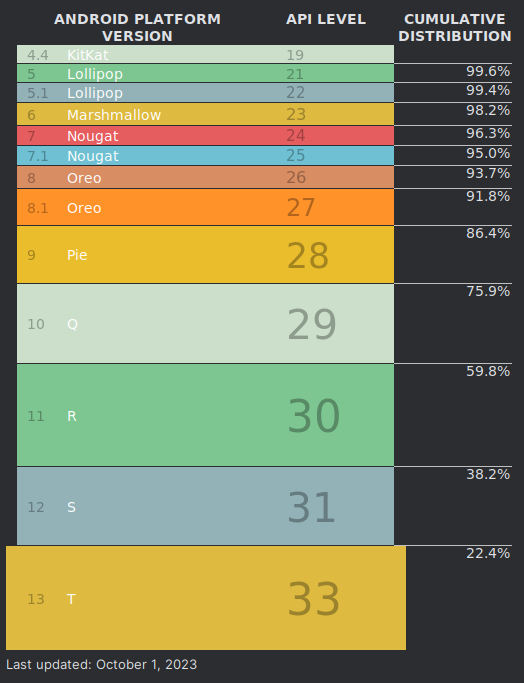
<p>Increasing the minSdkVersion of your Android app brings many technical benefits, by enabling a simpler development process along with security advantages.
With each increase to the minSdkVersion, fewer users will be able to use your app, so it is important to weigh the technical benefits against the drawback of losing users.
It’s also worth checking this segmentation for your app specifically, as the distribution of Android versions can vary by region.</p>

<p><img src="/assets/sdk-level-breakdown-oct-23.png" alt="image tooltip here" width="500" /></p>

<h2 id="cleaning-up-your-codebase">Cleaning up your codebase</h2>

<p>After increasing the <code class="language-plaintext highlighter-rouge">minSdkVersion</code> in your <code class="language-plaintext highlighter-rouge">build.gradle</code>, the first step is in cleaning your codebase is to identify and remove all obsolete code and resources. This can be done automatically by running Gradle lint, either locally or as part of a CI build. The lint check <code class="language-plaintext highlighter-rouge">ObsoleteSdkInt</code> should find any cases of code and resources rendered obsolete by the increased minSdk version. Alternatively, you could check manually:</p>
<ul>
  <li>Search your codebase for usages of <code class="language-plaintext highlighter-rouge">BUILD.VERSION_CODES</code>, <code class="language-plaintext highlighter-rouge">Build.VERSION.SDK_INT</code>, <code class="language-plaintext highlighter-rouge">@RequiresApi</code>, <code class="language-plaintext highlighter-rouge">@TargetApi</code>, and <code class="language-plaintext highlighter-rouge">tools:targetApi</code> to check for spots where your code branches depending on the SDK version.</li>
  <li>Check for qualified resources; for example, if raising your minSdkVersion from 22 to 23, the file <code class="language-plaintext highlighter-rouge">v23/styles.xml</code> could be removed. 
Remember that the OS will choose which resource to use by selecting the highest numbered directory compatible with the device’s SDK level. So the <code class="language-plaintext highlighter-rouge">v23/styles.xml</code> file, in this example, should be merged into the main <code class="language-plaintext highlighter-rouge">styles.xml</code> file rather than simply deleted.</li>
  <li>Search for instances of <code class="language-plaintext highlighter-rouge">tools:ignore="UnusedAttribute"</code> in XML files; they might be possible to remove, e.g. for the intent filter attribute <code class="language-plaintext highlighter-rouge">android:autoVerify</code> with an minSdk of 23 or higher.</li>
</ul>

<p>This rest of this blog post will focus mostly on new SDK features that become usable with a minSdk increase, as well as common hacks that become obsolete with an increased minSdk, but may not be guarded by an SDK level check that is easily searched for. Each section in the list below lists the cleanups enabled by an increase to the respective minSdkVersion or higher.</p>

<h2 id="14-ice-cream-sandwich">14 (Ice Cream Sandwich)</h2>

<ul>
  <li><a href="https://developer.android.com/develop/ui/views/graphics/vector-drawable-resources#vector-drawables-backward-solution"><code class="language-plaintext highlighter-rouge">VectorDrawableCompat</code></a> is supported from SDK 14 and up - you can replace your PNG files with vector assets.</li>
</ul>

<h2 id="19-44---444--kitkat">19 (4.4 - 4.4.4 / KitKat)</h2>

<ul>
  <li>Make use of the latest AndroidX library versions after their minSdk was increased <a href="https://android-developers.googleblog.com/2023/10/androidx-minsdkversion-19.html">from October 2023 onwards</a>.</li>
</ul>

<h2 id="21-50--lollipop">21 (5.0 / Lollipop)</h2>

<ul>
  <li>TLS 1.2 is supported. In case you added a <a href="[https://stackoverflow.com/questions/28943660/how-to-enable-tls-1-2-support-in-an-android-application-running-on-android-4-1]">workaround</a> to support TLS on older Android versions, it can be removed.</li>
  <li>The <a href="https://developer.android.com/build/multidex">multidex library</a> can be removed.</li>
  <li>You can use Jetpack Compose in your project.</li>
</ul>

<h2 id="23-60--marshmallow">23 (6.0 / Marshmallow)</h2>

<ul>
  <li><a href="https://developer.android.com/training/app-links/verify-android-applinks">App links</a> are enabled from Android 6.0 and up - so with minSdk of 23 or higher, you can assume that all target devices will handle verified links without showing the disambiguation interface.</li>
</ul>

<!-- - TODO `android:foreground` -->

<h2 id="24-70--nougat">24 (7.0 / Nougat)</h2>

<ul>
  <li>Full support for vector drawable features, without using backward compatibility:
    <ul>
      <li>You can remove <code class="language-plaintext highlighter-rouge">vectorDrawables.useSupportLibrary = true</code> from your <code class="language-plaintext highlighter-rouge">build.gradle</code> file.</li>
      <li>You can switch usages of <code class="language-plaintext highlighter-rouge">app:srcCompat</code> to <code class="language-plaintext highlighter-rouge">android:src</code>.</li>
      <li>Resource references can be used inside vector drawables (e.g. setting <code class="language-plaintext highlighter-rouge">fillColor="?attr/colorOnPrimary"</code>).</li>
    </ul>
  </li>
  <li>Support for the <a href="https://developer.android.com/about/versions/nougat/android-7.0#vulkan">Vulkan</a> 3D APIs.</li>
  <li>The ICU4J libraries (which provide Unicode and internationalization support) are available from the <code class="language-plaintext highlighter-rouge">android.icu</code> package. In case your app imports from <code class="language-plaintext highlighter-rouge">com.java.icu</code>, you can migrate to <code class="language-plaintext highlighter-rouge">android.icu</code> to reduce the .apk size.</li>
  <li>If your app is using a custom <code class="language-plaintext highlighter-rouge">X509TrustManager</code> (e.g., to trust an unsigned certificate for test servers in debug builds), you should migrate it to use a declarative <a href="https://developer.android.com/privacy-and-security/security-config">Network Security Config</a>, reducing the possibility of programmatic errors.</li>
</ul>

<!-- key attestation: probably outside the scope of 'cleanup', but definitely an advantage to minSdk 24 -->

<h2 id="25-71--nougat">25 (7.1 / Nougat)</h2>

<ul>
  <li>SDK 25 added support for  <a href="https://developer.android.com/develop/ui/views/launch/shortcuts">shortcuts</a>. In case your app uses them, make sure to merge the code into the main source set, e.g., from <code class="language-plaintext highlighter-rouge">xml-25/shortcuts.xml</code>.</li>
</ul>

<h2 id="26-80--oreo">26 (8.0 / Oreo)</h2>

<!-- - TODO `android:focusedByDefault` -->
<ul>
  <li>Support for Java APIs <code class="language-plaintext highlighter-rouge">java.time</code> is enabled - this means that you may no longer need to use a backward compatibility solution for this API, e.g., <a href="https://developer.android.com/studio/write/java8-support#library-desugaring">desugaring</a> or <a href="https://github.com/ThreeTen/threetenbp">ThreeTen</a></li>
</ul>

<!-- bibliography -->

<!-- this is pretty extensive, but I want to show how code can be cleaned up too -->

<!-- 24 -->

<!-- 26 -->]]></content><author><name></name></author><category term="tech" /><category term="blog" /><summary type="html"><![CDATA[Introduction]]></summary></entry></feed>